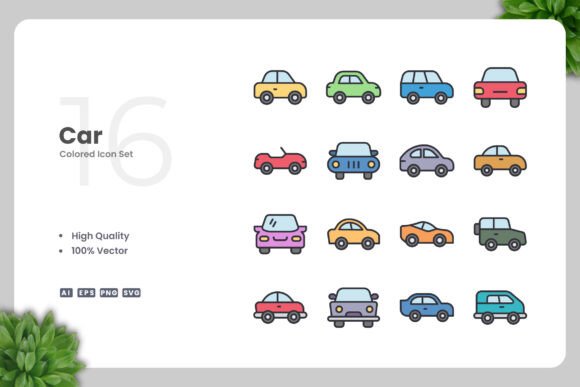
Car Color Icons for Clean, Versatile Design Projects
When you need a visual shorthand for automotive concepts, nothing beats a well-crafted icon set. Car Color Icons combine the recognizability of vehicle silhouettes with the flexibility of a clean, minimalist style. Whether you are building a mobile app, designing a print flyer, or creating social media graphics, these icons offer a straightforward way to communicate ideas without cluttering your layout.
What makes this set particularly useful is its simplicity. Each icon is built from clear lines and solid shapes, making it easy to scale, recolor, and adapt across different media. Because the files are fully vector, you retain complete control over every element. You can adjust the stroke weight, change the fill color, or combine icons to create new compositions.
Why Simple Car Icons Work Across Platforms
In a world of visual noise, clean icons cut through. A simple car icon can represent transportation, delivery services, automotive blogs, fleet management apps, or even educational materials about traffic safety. The key is that the design does not compete with your content — it supports it.
The Car Color Icons set is particularly effective because it offers variety within consistency. Multiple car types — sedans, SUVs, hatchbacks, and trucks — are drawn in the same style. This uniformity helps your audience instantly recognize the visual language you have established. When you use icons that share the same line weight, corner radius, and proportion, your project feels polished and intentional.
For mobile app designers, this means buttons, navigation bars, and onboarding screens can feature icons that load fast and look crisp on any screen density. For print designers, it means flyers and posters maintain sharp edges even at large sizes. The SVG and EPS files ensure that no matter where you place them, the quality remains high.
For Marketers and Small Business Owners
If you run an auto repair shop, rental service, or car dealership, you can use these icons in promotional materials. Replace generic stock photos with icon-based graphics in your email campaigns or website headers. A set of colored car icons on a landing page can visually categorize services: red icons for performance tuning, blue for detailing, green for eco-friendly options. This approach is both practical and memorable.
Social media posts also benefit from icon-based visuals. A simple car icon combined with a bold background color and a short message can be more effective than a crowded photo. You can resize icons easily in Adobe Illustrator or CorelDRAW, so adapting a square Instagram post into a rectangular Facebook cover takes minutes.
For Bloggers and Publishers
Bloggers covering automotive topics, travel, or lifestyle can use car icons as section dividers, bullet points, or infographic elements. Instead of relying on text-heavy lists, a row of icons can illustrate the steps of a car buying guide or the features of a new model. Because the icons are simple, they do not distract from the written content.
Ebook authors can embed these icons in chapter headings or sidebars. The PNG transparency files make it easy to drop them into any layout without background editing. If you publish in multiple formats — PDF, ePub, or print — having a single source file ensures consistency across versions.
For Educators and Hobbyists
Teachers creating worksheets or classroom presentations can use car icons to make learning materials more engaging. A math problem about speed and distance becomes more relatable when illustrated with a simple car graphic. Hobbyists building personal projects — like a car maintenance log or a family travel scrapbook — can use the icons to add a professional touch without needing advanced design skills.
The ability to change color easily is a big advantage here. You can match the icons to a school color scheme or a personal brand palette. Because the icons are vector, you can also scale them down for use in labels or stickers without losing clarity.
Web and Mobile Apps
For digital projects, load time and responsiveness matter. The SVG format is ideal because it is lightweight and scales perfectly on retina displays. You can also animate SVG icons using CSS or JavaScript, adding subtle hover effects or transitions. A car icon that changes color when clicked can enhance user experience without heavy code.
If you are building a dashboard or a data visualization, use car icons to represent different vehicle categories. This is more intuitive than using abstract shapes or text labels. The set’s clean design ensures that even at small sizes — like 24×24 pixels — the icons remain legible.
Print Materials
Flyers, banners, and posters often require high-resolution files. The EPS Version 10 and AI source files give you professional-grade output. You can print icons at poster size without pixelation. For business cards or brochures, you can reduce them to a few millimeters and they will still print cleanly.
When designing a series of print materials, consistency is crucial. The readme.txt file included in the set provides guidance on file organization, so you can quickly locate the format you need. Having all files in one bundle simplifies your workflow, especially if you work with a team or outsource production.
Color Strategy
Because the icons come in a clean neutral base, you can apply any color palette. For a corporate look, use monochromatic shades. For a children’s book, use bright primaries. For an eco-friendly brand, use muted greens and blues. The key is to limit your palette to two or three colors per project to maintain visual harmony.
If you are designing a multi-page document, create a color guide at the start. Use the same color for all car icons on a page to avoid visual confusion. You can easily adjust this in Illustrator or CorelDRAW by selecting the icons and changing the fill or stroke color globally.
Combining Icons
Icons can be grouped to tell a story. For example, arrange a row of cars in different colors to represent a fleet, or place a car icon next to a map icon to suggest navigation. You can also overlay icons with text or other shapes to create custom badges or logos. The vector nature of the files means you can ungroup, edit, and regroup elements without quality loss.
For infographics, use car icons as data points. Instead of a standard bar chart, use a series of car icons filled with color to represent quantities. This approach makes data more accessible and visually interesting.
File Management
The Car Color Icons bundle includes separate files for AI, EPS, SVG, and PNG. Keep your master files in a single folder and export copies for specific uses. For example, store your editable AI files in one folder, your web-ready SVGs in another, and your print-ready EPS files in a third. This prevents accidental edits to source files and makes collaboration easier.
Name your files consistently. If you customize an icon for a specific project, save it with a descriptive name like “blue-sedan-icon.svg” rather than “icon-final.svg.” This habit saves time when you revisit projects months later.
Audience-Friendly Design
Always consider who will see your icons. For a professional audience, keep the design restrained and avoid overly bright colors. For a general audience, use recognizable colors — red for sports cars, yellow for taxis, green for electric vehicles. The icons themselves are neutral, so the meaning comes from how you contextualize them.
Test your icons at actual use sizes. An icon that looks good on your 27-inch monitor may appear too detailed on a mobile screen. The Car Color Icons are designed with simplicity in mind, so they generally hold up well at small sizes, but it is always wise to preview.
Final Thoughts on Using Car Color Icons
A good icon set does more than save time — it raises the quality of your work. Car Color Icons offer a foundation that you can build upon for years. Whether you are a freelance designer working on a tight deadline, a marketer preparing a campaign, or a teacher creating classroom materials, these icons give you a reliable visual tool.
The combination of 100 vector scalability, easy color customization, and multiple file formats means you can focus on the creative part of your project instead of technical limitations. And because the design is simple and clean, your final output will look modern and professional.
Start your next project with confidence. Open the AI or EPS file in your preferred vector software, adjust the colors to match your brand, and place the icons where they add value. The result will be a cohesive, effective design that communicates clearly.
Thank you for considering this icon set. Whether you are building a website, designing a mobile app, creating a book layout, or producing social media content, these icons are ready to work for you.