Construction Tools Vector Icons Set
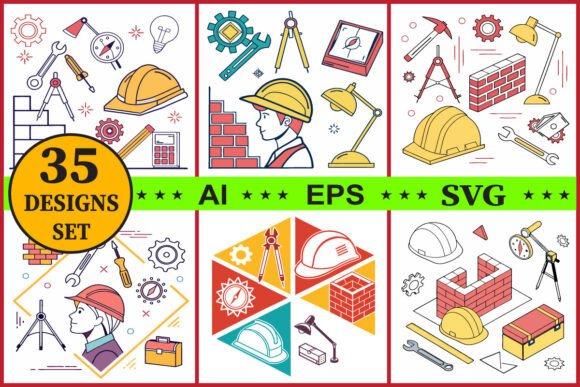
Visual communication matters in every industry, and construction is no exception. Whether you are designing a logo for a local contractor, building a website for an engineering firm, or creating an infographic about workplace safety, the right icons can communicate complex ideas quickly and professionally. The Construction Tools Vector Icons Set offers exactly that: a cohesive collection of 35 high-quality vector graphics covering hard hats, hammers, wrenches, blueprints, bricks, gears, compasses, and other essential tools. Available in AI, EPS, and SVG formats, this bundle is designed for immediate use across print and digital projects. But beyond the basic description, this set opens up a world of creative possibilities for designers, marketers, educators, and small business owners alike.
The line art style is clean and modern, which means it works well in both minimalist and detailed compositions. Because each icon is fully editable and scalable, you can adjust stroke weights, colors, and sizes without losing resolution. This flexibility makes the set suitable for everything from tiny app icons to large-format posters. Let’s explore how different users can leverage these tools to enhance their projects and stand out in a crowded market.
Why Vector Icons Make Sense for Construction-Themed Design
Vector graphics are resolution-independent, so they remain sharp at any size. For construction-related designs, this technical advantage translates into practical benefits. A blueprint icon that looks crisp on a business card will also look professional on a billboard. The Construction Tools Vector Icons Set is delivered in SVG, EPS, and AI formats, ensuring compatibility with almost any design software—Adobe Illustrator, Affinity Designer, Sketch, Figma, or even free tools like Inkscape. This saves time and frustration because you won’t need to convert or redraw assets.
Moreover, the set includes 35 distinct icons, which gives you enough variety to build a complete visual language. Repetition of similar icons across a project can feel monotonous, but with tools ranging from a compass (symbolizing precision) to a gear (representing mechanics), you can create nuanced messaging. The icons also share a consistent aesthetic—thin, uniform lines with balanced proportions—so they look like they belong together. This is crucial for brand identity, where inconsistency can undermine professionalism.
Designers Creating Brand Identities
If you are a freelance designer or an in-house creative, you know how time-consuming it is to source cohesive icon sets. The Construction Tools Vector Icons Set allows you to quickly assemble a logo or a brand mark using one of the icons as a central motif. For example, a hardware store might use the hammer icon combined with a custom wordmark. Because the icons are editable, you can modify the hammer shape to incorporate a specific local landmark or colour palette. The included AI files are well-organised, so you can rearrange, combine, or duplicate elements without losing layered structures.
Beyond logos, these icons are ideal for social media graphics, email headers, and website navigation bars. A construction company’s Instagram feed might use the hard hat icon as a recurring visual cue for safety tips. Consistency across platforms builds recognition and trust. And because you own the commercial rights, you can use them in client projects without worrying about attribution.
Small Business Owners and Entrepreneurs
Running a small construction business means wearing many hats—and you also need to market yourself effectively. The Construction Tools Vector Icons Set makes it easy to create branded materials without hiring a designer for every small task. You can produce professional-looking quotes, invoices, and service checklists by adding a relevant icon next to each heading. For example, a wrench icon beside “plumbing,” a brick icon beside “masonry,” and a blueprint icon beside “design.”
Print-on-demand (POD) is another avenue. Many entrepreneurs sell t-shirts, hoodies, and mugs with construction-themed designs. Using these vector icons, you can create merchandise that appeals to builders, DIY enthusiasts, and industry trade shows. The SVG files are perfect for direct uploads to print-on-demand platforms like Printful or Redbubble. Because the files are high-resolution and print-ready, the final product will look sharp. Just be mindful that colours may vary between on-screen previews and actual prints—always request a physical sample before a bulk order.
Educators and Training Material Creators
Teachers in trade schools, safety instructors, and online course creators need clear visuals to explain technical concepts. The Construction Tools Vector Icons Set can be used to build infographics, step-by-step guides, and flashcards. Imagine a poster showing proper hard hat usage: a series of sequential icons with brief annotations. The clean line art reduces cognitive load, allowing learners to focus on the process rather than decorative distractions.
Similarly, presentation slides for engineering classes become more engaging when you incorporate icons instead of bullet points. A slide about load-bearing walls could use the brick icon, the gear icon for mechanical systems, and the compass for measurements. Students will find the material more approachable. And because you can scale the icons, they remain readable even when projected on a large screen.
DIY Hobbyists and Bloggers
If you run a home improvement blog or a YouTube channel about woodworking, your visual branding should reflect your hands-on expertise. The Construction Tools Vector Icons Set can become the signature element in your blog header, favicon, or episode titles. A gear icon next to “tool reviews” or a hammer next to “DIY projects” instantly signals the content’s focus. You can also use the icons in infographics comparing tool types or in printable plans for subscribers.
For sublimation and digital downloads, these icons are especially useful. Many crafters sell iron-on transfers or printable stickers for water bottles, laptops, and toolboxes. The vector files allow you to resize the icons to exactly fit a 3-inch circle or a 10-inch banner without any pixelation. Just ensure you flatten the artwork correctly for the medium you’re using.
Keeping Results Clear and Effective
While the icons are designed to be ready-to-use, a few practical considerations will help you maintain quality and consistency. First, always work from the original vector file (AI or EPS) rather than a rasterised version. If you need to convert to a bitmap for a specific platform, use a high DPI setting (300 for print). When you adjust colours, think about contrast: a line art icon on a dark background may need a lighter stroke weight or a filled version. The set does not include filled alternatives, but you can easily create them by converting strokes to outlines and using the shape builder tool.
Organising your project files also pays off. The 35 AI files come separately, so you might want to combine your selected icons into a single document for efficiency. Create a master library by dragging the icons into a new file, then save as a template. This way, you can quickly drag the needed icon into any new design.
Another tip: maintain consistency by using the same stroke width across all icons in a single project. The icons in this set already follow a uniform line style, but if you scale one icon larger than another, the stroke thickness will change proportionally. To prevent this, keep all icons at the same scale or use the “Scale Strokes & Effects” option turned off in your design application when resizing.
Adapting Icons for Different Formats and Platforms
Different projects demand different file types. For web design, SVG is king because it loads quickly and scales responsively. The Construction Tools Vector Icons Set includes SVG files, so you can directly embed them into HTML or import them into prototyping tools like Figma. If you need a favicon, modify one of the simpler icons (like the hard hat or screwdriver) down to 16×16 pixels—the vector will keep it crisp.
For print, EPS and AI are preferred, but you may also export as high-resolution PNG for smaller run prints. Remember that colours on screen can differ from print due to device calibration and ink types. Always request a printed proof for critical projects like company brochures or signage. The set’s original black line art is the safest starting point if you are uncertain about colour matching.
Infographics are a natural fit for construction icons. You can use them to break down a process: planning (blueprint), digging (shovel), building (brick), and finishing (paint roller). Arrange the icons in a circular flow and add short text labels. Because the icons are neutral in tone, they won’t distract from your data or instructions.
Staying Original and Audience-Friendly
One risk of using any icon set is that your work may look generic if you don’t customise enough. To make your designs stand out, combine icons with custom typography, unique colour palettes, or subtle textures. For example, a safety poster could use the hard hat icon rotated slightly and paired with a rugged sans-serif font and a yellow-black colour scheme. Add a distressed effect for a construction-site vibe. The editable nature of the files gives you full control over such adjustments.
Also, consider your audience. A contractor targeting high-end residential clients may prefer a more refined look—thin, elegant lines with a monochrome palette. A company focusing on heavy industrial work might use bolder strokes and primary colours. The icons can be adapted to either direction because they are simple shapes without excessive detail. Test a few variations and gather feedback before finalising.
Finally, give credit where it’s due—not legally required for this set, but ethically, supporting creators helps sustain high-quality resources. Leaving a review for the Construction Tools Vector Icons Set encourages the designer to produce more valuable assets. And by following their profile, you can stay updated on new releases that might complement your collection.
Getting Started Today
The Construction Tools Vector Icons Set is a digital download, so you can begin working within minutes of purchase. Unzip the folder, browse the 35 files, and drop them into your project. Whether you are a seasoned designer or a small business owner wearing many hats, these icons will save you hours of illustration work. With commercial use allowed, you can confidently incorporate them into client projects, merchandise, and print runs.
Start by picking three to five icons that best represent your brand or message. Arrange them in a grid, test different colours, and see how they interact. Very soon, you will notice how much cleaner and more professional your designs look. The construction industry is built on precision and reliability—your visual materials should reflect the same values. This icon set gives you a solid foundation to achieve that, one vector at a time.