Data Upload Color Icons: A Balanced Look at Their Use and Alternatives
When you need visual cues for file sharing, cloud storage, or digital transfers, icons play a crucial role in guiding users and improving interface clarity. Among the many icon sets available, Data Upload Color Icons have gained attention for their clean design and vibrant palette. But how do they compare with other icon options, and when are they the right choice? This article explores the features, strengths, and tradeoffs of Data Upload Color Icons to help you decide if they fit your project.
What Are Data Upload Color Icons?
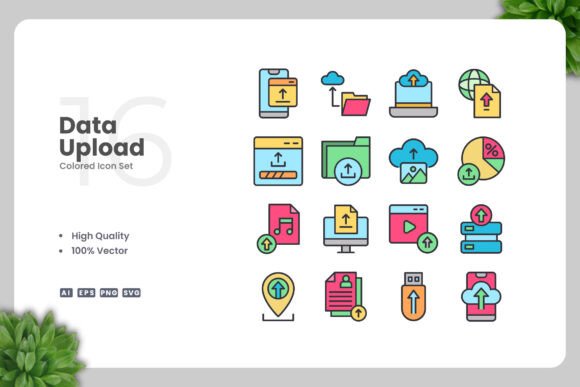
Data Upload Color Icons are a set of vector-based icons specifically themed around data upload actions, such as uploading files, syncing data, or transferring information. They are designed with a simple and clean aesthetic, utilizing color to enhance visibility and meaning. Each icon is provided in multiple formats, including AI (Adobe Illustrator), EPS version 10, SVG, and PNG with transparency. The set includes 100 vectors, all customizable and high quality. According to the creator, Upnowgraphic, these icons are "easy drag and drop" and come with a readme.txt for quick start.
The distinct advantage of Data Upload Color Icons lies in their immediate usability across diverse media—websites, mobile apps, books, social media graphics, infographics, flyers, print materials, banners, and posters. Because they are vector files, you can resize them without loss of quality and change colors using software like Adobe Illustrator or CorelDRAW. This flexibility makes them a versatile resource for designers who need icons that adapt to different contexts.
How Data Upload Color Icons Compare with Other Icon Formats
Icon sets vary widely in format, style, and customization potential. Understanding where Data Upload Color Icons fit can help you evaluate their suitability for your specific needs.
Vector vs. Raster Icons
Many icons are distributed as raster images (e.g., PNG, JPEG), which have fixed dimensions and can become pixelated when enlarged. In contrast, Data Upload Color Icons are primarily vector-based (AI, EPS, SVG), allowing infinite scalability without degradation. This is essential for print materials like posters or banners where high resolution is critical. However, the set also includes PNG files with transparency, which are convenient for quick web use but lack the scalability of vectors.
Color vs. Monochrome Icons
While monochrome icons offer simplicity and are often preferred for minimal interfaces or accessibility, Data Upload Color Icons bring a splash of color that can make upload actions more intuitive or engaging. For example, a blue upload arrow might universally signify data transfer, but color can help differentiate between upload, download, and sync functions in a crowded UI. On the downside, color icons may not suit every brand palette or cultural context, and they can increase visual noise if used excessively. The ability to recolor these icons in vector software partially mitigates this, but it requires effort if you need a consistent monochrome look.
Customization and File Support
Data Upload Color Icons offer extensive customization through source files in AI and EPS formats. Other icon sets might only provide PNG or limited vector support. The inclusion of SVG files is also beneficial for web developers who prefer scalable vector graphics directly in HTML or CSS. The readme.txt file provides basic instructions, which is helpful for beginners. However, for teams working with specialized design tools like Sketch or Figma, additional conversion may be needed, whereas some icon sets offer native plugins for these platforms.
Strengths and Tradeoffs of Data Upload Color Icons
Every design resource has its strong points and limitations. Knowing both sides helps you make a measured choice.
Strengths
- High Quality and Versatility: The icons are crafted with a clean, professional look that works across digital and print media. The 100-vector set covers a range of data upload scenarios, from cloud symbols to arrows, making it a comprehensive kit.
- Ease of Editing: Because they are vector files, you can easily change colors, resize, or combine icons using software like Adobe Illustrator or CorelDRAW. This is particularly useful for branding where strict color adherence is required.
- Multiple Formats: The inclusion of AI, EPS, SVG, and PNG files means you have flexibility for different workflows. For instance, SVG works well for responsive web design, while PNG is handy for quick placements in presentations or social media posts.
- Immediate Usability: The drag-and-drop nature of the files simplifies integration, especially for designers who prefer a straightforward approach without extensive setup.
Tradeoffs
- Specific Theme: Data Upload Color Icons are focused on upload actions. If your project requires icons for diverse categories like settings, profiles, or navigation, this set alone may not suffice. You might need to combine it with other icon sets, which could lead to style inconsistencies.
- Color Dependency: While color adds appeal, it can also restrict usage. For example, in grayscale printing or minimalist designs, the pre-applied colors might clash. Editing them to grayscale is possible but adds a step.
- Software Requirements: To fully leverage customization (e.g., changing colors or merging vectors), you need vector editing software like Illustrator or CorelDRAW. If you lack such tools, the PNG files are still usable but limit you to the original colors and sizes.
- File Format Limitations: While AI and EPS are standard for professional design, they may not be directly compatible with all software. For instance, some free vector editors may not support these formats fully, whereas SVG is more universally supported.
Best-Fit Use Cases for Data Upload Color Icons
Based on the strengths outlined, Data Upload Color Icons are particularly well-suited for the following scenarios:
- Digital Interfaces: Mobile apps or websites that feature data upload functionality can benefit from these icons as clear call-to-action elements. The colors can make upload buttons stand out, improving user experience.
- Print Materials: Flyers, posters, and banners that need to communicate data transfer visually can use these icons. Since they are vector, they can be scaled to any size without quality loss.
- Social Media and Infographics: For posts or graphics that explain cloud services or file sharing, these icons add a professional touch. The PNG files are ready to use in tools like Canva or Photoshop.
- Books and E-books: Illustrations in digital or print books about technology can incorporate these icons for visual support. The clean design ensures they don't distract from the text.
Example: A tech blog designing an infographic about data security might use Data Upload Color Icons to symbolize encrypted uploads. With vector editing, the icons can be recolored to match the blog's brand colors, ensuring consistency.
When Other Options Might Be a Better Fit
While Data Upload Color Icons are versatile, they are not universally ideal. Consider alternatives if any of the following apply:
- Strict Monochrome Requirements: If your project demands grayscale icons (e.g., for accessibility or specific design guidelines), a set of monochrome icons might save editing time. Data Upload Color Icons can be desaturated, but dedicated grayscale sets often have optimized contrast.
- Broad Icon Sets: For large projects that need hundreds of icons across multiple categories, Data Upload Color Icons limited 100-set focusing on upload actions may be insufficient. In such cases, a comprehensive icon library with categories like arrows, files, devices, and actions would be more efficient.
- Budget Constraints: While Data Upload Color Icons are likely reasonably priced, there are free icon sets available (e.g., Font Awesome, Material Icons) that offer extensive collections. However, free sets often have fewer customization options or require attribution.
- Platform-Specific Needs: If you are designing exclusively for iOS or Android, native icon libraries might integrate more seamlessly with platform guidelines. Data Upload Color Icons can still be used, but you may need to adjust styles.
Example: A corporate presentation that uses a strictly black-and-white theme would be better served by simple line icons. While you could edit Data Upload Color Icons to remove color, working from a monochrome set from the start reduces effort.
Making an Informed Decision
To decide if Data Upload Color Icons are right for your project, consider the following factors:
- Identify Your Core Needs: Are you creating a mobile app interface, a printed brochure, or social media graphics? The media type influences file format preferences. For print, vector formats are crucial; for web, SVG or PNG may suffice.
- Evaluate Customization Requirements: Do you need to change icon colors to match a brand? If yes, the vector files in Data Upload Color Icons give you full control. If not, pre-colored PNGs may work.
- Assess Scope of Icon Set: This set covers data upload actions thoroughly. If your project involves other categories, consider supplementing with additional icons or a broader set.
- Consider Skill Level: If you or your team are comfortable with vector editing software, the customization potential is a major advantage. For less experienced users, the PNG files provide easy drop-in use, but customization may be limited.
- Balance Cost and Value: While not specified, likely these icons are a paid resource. Compare the cost against the time saved versus sourcing free alternatives or creating your own icons.
For many designers, Data Upload Color Icons represent a practical middle ground—offering more flexibility than raster-only sets and more visual appeal than monochrome vectors. Their strength lies in the combination of clean design, color variety, and ease of editing. However, they are not a one-size-fits-all solution. By weighing the tradeoffs outlined here, you can determine whether this icon set aligns with your project goals, workflow, and aesthetic preferences.
Ultimately, the best icon choice depends on your specific context. Data Upload Color Icons provide a solid foundation for projects where data upload actions need clear, attractive representation. With proper evaluation, you can leverage their strengths while mitigating limitations, ensuring your final design communicates effectively.