Weather Silhouette Vector Bundle: Creative Applications
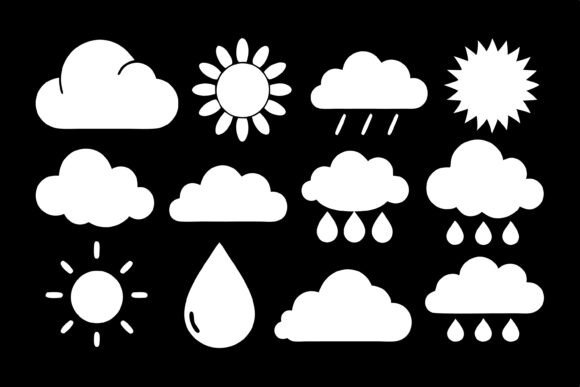
When you work with visual content, having reliable icons that communicate clearly is essential. The Weather Silhouette Vector Bundle offers a collection of weather symbols in a clean black silhouette style. From sun and clouds to rain, lightning, snowflakes, wind, tornado, umbrella, and storm icons, this bundle covers a wide range of atmospheric conditions. The silhouettes are bold enough to be legible at small sizes yet detailed enough to convey specific phenomena. Whether you are building a weather app, designing an infographic, or creating merchandise, these vectors provide a solid foundation.
The bundle comes in JPG and EPS formats, so you can edit the vectors in software like Adobe Illustrator or Affinity Designer. The EPS format preserves scalability, allowing you to resize icons without losing quality. This is especially important when the same icon needs to work on a business card and a billboard.
What Makes This Bundle Useful
The appeal lies in adaptability. You can change colors, match brand palettes, or combine multiple icons to tell a story. A sun paired with a cloud can represent partly cloudy weather. Adding a rain icon underneath creates a visual sequence users can interpret at a glance. This modular design saves time spent creating custom illustrations from scratch.
Marketers and content creators need visuals that work across platforms. The same weather icon in a mobile app can appear in a social media post, newsletter header, or printed flyer. The minimalist silhouette style looks modern and does not compete with other design elements. If you produce content for weather forecasts, travel blogs, or outdoor event promotions, these icons can save hours of work.
Creative Applications for Different Users
Educators and hobbyists find these vectors useful for presentations, worksheets, and classroom materials. Weather is common in science lessons, and clear icons help students connect symbols with concepts. You can create matching games, flash cards, or diagrams explaining weather patterns. The black silhouette style is easy to print and photocopy. Because the files are editable, you can adjust icon sizes to fit handouts or posters.
Small business owners can use the bundle for branding and marketing. A local outdoor gear shop, gardening center, or travel agency might incorporate weather icons into signage, website icons, or promotional materials. The consistent style ensures all icons look like they belong together, which builds brand recognition.
For print-on-demand products, the bundle works well for t-shirts, stickers, mugs, and tote bags. Weather icons appeal to outdoor enthusiasts, travelers, and minimalist design fans. Create single-icon designs or arrange multiple icons in a pattern. The EPS format is widely supported by print-on-demand platforms.
Infographics and Data Visualization
Infographics benefit from these icons as visual anchors. An infographic about annual rainfall might use a rain icon at the top of each bar. A chart comparing temperatures could use sun and snowflake icons for extremes. The icons make data more accessible. Place them near relevant data points and use consistent sizing.
Social Media and Content Series
For social media, use the icons in a series. A daily weather forecast post can feature different icon combinations. This creates a predictable visual pattern followers recognize. You can also animate icons in video editing software — a rotating wind icon or flashing lightning bolt adds dynamism. The silhouette style is easy to overlay on different backgrounds.
Bloggers and website owners can improve user experience with weather icons. Add a weather widget to a travel blog or outdoor lifestyle site. The icons can appear in navigation, sidebars, or footers. Vector files are lightweight and do not slow page load times. Export as SVG or PNG depending on your platform. The clean silhouette looks crisp on retina displays.
Practical Tips for Working with Vectors
When working with vectors, organization is key. Preview all icons and group them by category before starting a project. Create sets for sunny, rainy, windy, and stormy conditions. This upfront sorting speeds up your workflow. If you collaborate with a team, clearly labeled icons help everyone stay aligned.
Consistency goes beyond using the same style. Test icons at small sizes for mobile apps or smartwatch displays. The silhouette style works well because fine details are not lost when scaled down. For larger formats like posters, you can add texture or pattern fills inside the silhouettes without breaking the clean look.
Combine weather icons with typography for impact. A bold sans-serif font paired with a sun icon creates a strong header for a weather report. A rain icon next to a temperature reading gives immediate context. Keep spacing consistent and align icons with text baselines. Most vector software allows snapping to a grid for precision.
Adapting for Audiences and Platforms
When adapting for different audiences, consider cultural associations. A tornado icon may have different meanings in regions where tornadoes are common versus rare. Snowflakes are relevant in colder climates but abstract in tropical regions. If your audience is global, use universally understood icons like sun for clear skies and clouds for overcast conditions.
To keep results original, modify icons rather than using them exactly as they appear. Rotate, scale, or combine with other elements. Use icons as a starting point for more complex illustrations. Trace over the silhouette, add gradients, or overlay textures. Treat the bundle as a resource, not a final product. This ensures your work stands out while benefiting from a consistent visual foundation.
Practical recommendations: always keep backups of original files. Create a separate folder for edited versions. Use layers in your design software. If combining icons with other graphics, match line weights and styles. Test designs on the intended output medium before finalizing.
The Weather Silhouette Vector Bundle is a versatile tool for anyone needing clear, scalable weather icons. The clean black silhouette style works across digital interfaces and physical merchandise. The editable EPS format gives full control over customization. Whether you are a designer building an app, a marketer creating a campaign, or an educator preparing a lesson, this bundle streamlines workflow and adds a professional touch. With thoughtful organization and creativity, you can adapt these vectors to suit your specific goals and audience.