Vertical Timeline After Effect: A Practical Tool for Chronological Storytelling
Timelines remain one of the most effective ways to present sequential information, whether you are mapping a product roadmap, tracing company history, or showcasing career milestones. The challenge is translating that linear structure into a format that holds attention and communicates clearly. A Vertical Timeline After Effect template offers a practical solution, combining motion design with a clean vertical layout to turn dates and events into a compelling visual narrative. This article evaluates what this template provides, where it excels, and who stands to benefit most from incorporating it into their projects.
What Defines the Vertical Timeline After Effect Template
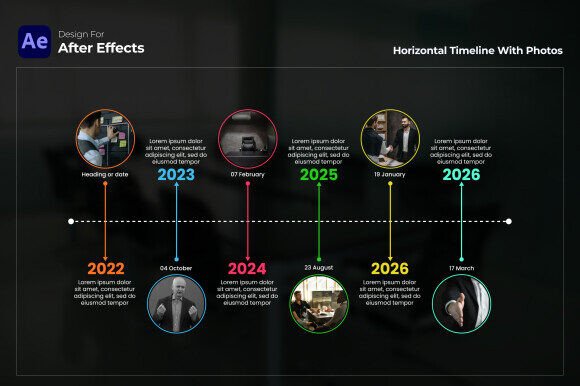
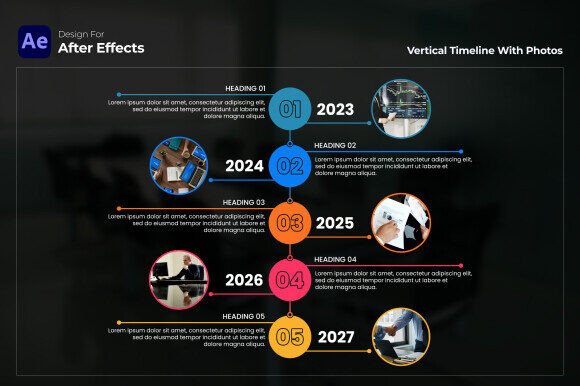
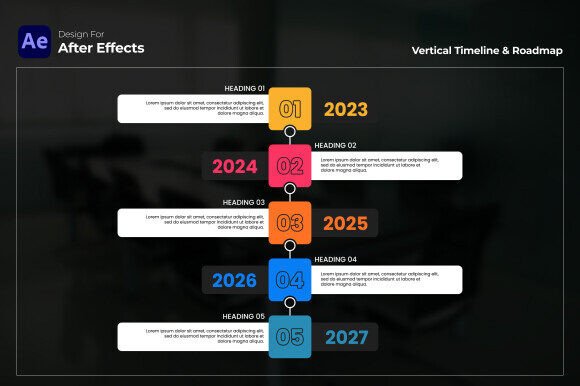
At its core, this template is a pre-built After Effects composition designed to display events in a vertical sequence. Each entry pairs a year or key date with an icon and a short description, creating a structured flow from top to bottom. The design emphasis is on clarity and visual pacing, allowing viewers to move through information without feeling overwhelmed. Unlike horizontal timelines that may fight screen width limitations, the vertical orientation aligns naturally with scrolling behavior and portrait-oriented displays, making it a strong choice for modern content consumption.
The template is optimized for After Effects CC 2023 and newer versions. No third-party plugins are required, which simplifies setup and reduces compatibility concerns. The project is fully customizable, meaning you can adjust colors, replace icons, edit text, and tweak timing to match your brand or narrative needs. Output is Full HD resolution, suitable for both web delivery and presentation use.
Structural Clarity for Sequential Content
The vertical arrangement does more than look clean. It imposes a natural reading order. Each milestone sits clearly above or below the next, reducing the cognitive load on your audience. This is especially valuable when your content includes multiple events that need to be understood in relation to one another. The template includes placeholder icons for each entry, which serve as visual anchors. When you replace those with relevant imagery, viewers can scan the timeline quickly and grasp the gist before diving into the details.
Customizable Visual Identity
Colors and icons are not locked in. You can assign distinct hues to different phases of a project or to categories within a company history. This flexibility helps the timeline function as both a chronological tool and a visual categorization system. For example, a product development timeline might use green for design phases, blue for development, and orange for launch milestones. The template supports this kind of color coding without requiring complex expressions or workarounds.
The included free font link removes one common friction point. Typography often gets overlooked in template-based projects, but the font link ensures your text appears sharp and consistent. If you prefer your own typeface, you can swap it without breaking the layout.
Time Efficiency Without Sacrificing Quality
Building a timeline from scratch in After Effects is entirely possible, but it is rarely the best use of time. Between positioning layers, parenting text to markers, and animating entries, a custom timeline can take hours. This template streamlines that process. The animation is already timed, the spacing is balanced, and the transitions are smooth. You drop in your content, adjust colors, and render. For freelancers and small teams juggling multiple projects, that efficiency translates directly into faster turnaround and lower production cost.
That said, the template is not a black box. Because it is fully customizable, you can push beyond simple text swaps. Adjust the timing of each entry if your narration requires a faster or slower pace. Change the background treatment. Modify the icon style. The template serves as a foundation, not a cage.
Real-World Performance and Limitations
In practice, the Vertical Timeline After Effect template holds up well for standard corporate and marketing use cases. The Full HD resolution is adequate for social media, website headers, internal presentations, and trade show displays. The lack of plugin dependencies means fewer render-time surprises and easier collaboration across teams that may not have identical plugin libraries.
One limitation worth noting is the fixed orientation. If your project demands a horizontal or zigzag timeline, you would need to modify the layout significantly, which could undermine the time-saving advantage. The template is best used when the vertical format aligns with your distribution platform. For Instagram Stories, LinkedIn carousels, or mobile-first websites, vertical works naturally. For widescreen video or traditional slides, you may need to adjust framing or add side elements to fill the horizontal space.
Another consideration is animation complexity. The template provides smooth, professional motion, but it is not designed for high-energy, rapid cuts. The pacing leans toward polished and deliberate, suitable for explainer videos, corporate storytelling, and educational content. If you need a kinetic typography sequence with rapid-fire transitions, this template may feel restrained.
Product Managers and Project Teams
Product roadmaps require clarity above all else. Stakeholders need to see what ships when and how phases connect. This template lets you present that information in a format that feels more polished than a static slide and more structured than a freeform diagram. You can include icons for features or milestones, use color to indicate priority, and animate the timeline to walk through the plan step by step.
Marketers and Content Strategists
Brand storytelling often involves tracing a company journey, campaign performance over time, or the evolution of a content strategy. A well-built timeline makes that narrative concrete. The icon and description pairing helps audiences remember key moments. Marketers can repurpose the timeline for blog posts, social media assets, and pitch decks without rethinking the layout each time.
Freelancers and Creators
Portfolio timelines benefit directly from this structure. Freelancers can showcase project history, skills progression, or client work in a format that demonstrates both professionalism and design sensibility. Since the template is easy to customize, you can maintain consistency across different portfolio pieces while adjusting colors and icons to match each project's tone.
Educators and Small Business Owners
For educators, timelines are a natural way to present historical events, biological processes, or project-based learning sequences. Small business owners can use the template for company history pages, event recaps, or even onboarding materials that walk new hires through company milestones.
Quality and Long-Term Value
The template's quality rests on its clean design and reliable performance. No plugin dependencies reduce long-term maintenance issues. If you update After Effects versions, the project file is likely to remain compatible as long as you stay within CC 2023 or newer. The customization options mean the template can serve multiple projects across different clients or internal teams, improving its return on investment over time.
One practical recommendation is to build a small library of color palettes and icon sets that you can drop into the template as needed. Doing so reduces setup time for future projects and ensures visual consistency across your work. The template itself does not include a large icon library, but you can source icons from free or paid collections and import them easily.
Another recommendation is to test the template with real content early. Swap the placeholder text and icons with your own material and preview the full timeline. This reveals spacing issues, text length constraints, or timing mismatches before you invest time in polishing the animation. The template description highlights user-friendly navigation, and that holds true, but like any After Effects project, some familiarity with the software's interface helps you make changes efficiently.
Practical Considerations Before Purchase
If you are evaluating whether this template fits your workflow, consider the following. First, confirm your After Effects version. The template requires CC 2023 or higher. If you are on an older version, you may encounter compatibility issues. Second, think about your typical output format. Full HD is a solid standard, but if your primary distribution is 4K or vertical social formats, you may need to adapt the composition. Scaling up resolution is possible, but check that text and icon quality remain acceptable. Third, assess your comfort level with template customization. While the template is described as user-friendly, making substantial changes to layout or animation logic requires basic After Effects skills.
The template's strengths lie in its efficiency, clarity, and professional finish. It is not a replacement for fully custom motion design, nor is it intended to be. For professionals who need reliable, good-looking timelines without starting from zero, it offers a practical middle ground. The lack of a plugin requirement is a significant advantage for collaborative environments where not everyone manages their plugin sets identically.
In terms of presentation effectiveness, the vertical timeline works because it respects how people process sequential information. The combination of year, icon, and description provides multiple entry points for understanding. Viewers can scan icons, read dates, or dive into descriptions based on their interest level. That flexibility makes the template suitable for both detailed presentations and quick overviews.
For brand performance tracking or content strategy reviews, the timeline format adds structure to data that might otherwise feel disconnected. Instead of listing dates in a spreadsheet, you illustrate the trajectory. That visualization helps teams identify patterns, gaps, or successes that raw data obscures.
Ultimately, the Vertical Timeline After Effect template delivers on its core promise: it makes chronological storytelling more visual, more structured, and faster to produce. Whether you are building a one-time project or a reusable asset for recurring updates, the template provides a solid foundation that balances flexibility with ease of use.