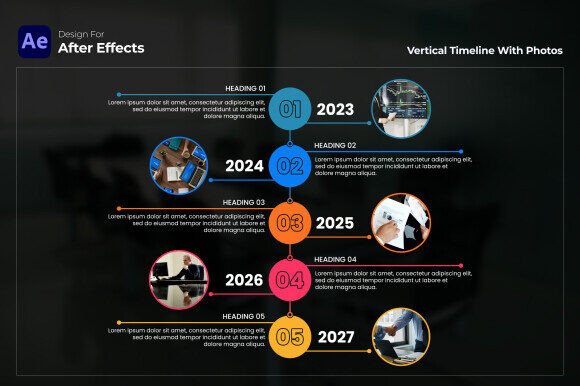
Vertical Timeline with Photos AE – Visual Storytelling for Everyone
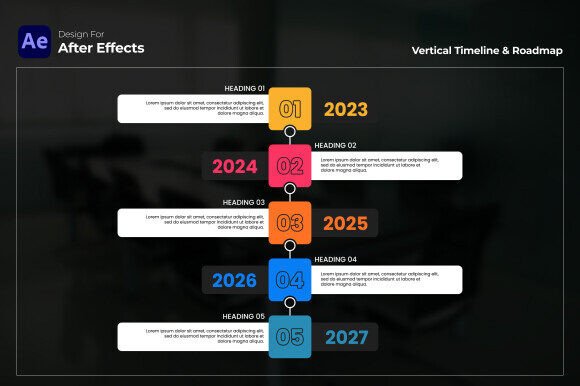
Timelines have long been one of the most effective ways to show change over time. When photos are added to each point, the story becomes not only clearer but also more memorable. The Vertical Timeline with Photos AE template is a ready-made After Effects layout that places events in a clean vertical flow, with dedicated photo placeholders at each milestone. It is designed for anyone who needs to present a sequence of events visually—whether for a business presentation, a personal portfolio, or an educational project.
Rather than building a timeline from scratch, this template provides a structure that you can adapt quickly. It works with After Effects CC 2023 and above, requires no plugins, and is fully customizable. That means you control the colors, fonts, images, and timing without needing to design the layout yourself.
Who benefits from this template?
Different audiences will approach the same tool with different expectations. A marketer may care most about speed and polish, while a freelancer may prioritize flexibility and low cost. Understanding how this template fits your specific context can help you decide if it is the right choice for your next project.
Creators and content strategists
If you produce videos or social media content, you know that visual sequences can make or break engagement. A timeline with photos is ideal for showing brand milestones, product evolution, or content strategy reviews. Instead of stitching together separate clips, you can use the Vertical Timeline with Photos AE to create a cohesive narrative. Each milestone becomes a visual anchor, helping viewers follow the story without confusion. For a content audit, for example, you could show how your strategy shifted over four quarters, with a photo or screenshot representing each phase.
Business owners and entrepreneurs
When you are pitching to investors or presenting a roadmap to your team, clarity is everything. A timeline that mixes dates with relevant images helps people grasp complex information in seconds. You might use this template to show your company history, from founding through key product launches. Or you could map out a product roadmap for the next year, with mockups or concept art at each milestone. The vertical layout works well on slides, websites, and even printed materials. For entrepreneurs who wear many hats, the time saved by using a pre-built template is a real advantage.
Educators and trainers
Teaching often involves sequences—historical events, biological processes, project phases. The Vertical Timeline with Photos AE makes these sequences visible and concrete. You can add an image for each step, which helps students connect facts with visuals. For an art history lesson, you could place paintings in chronological order. For a science module, you might show the stages of an experiment. The template is straightforward enough that educators who are not video professionals can still produce polished materials.
Freelancers and creatives
If you are a freelancer building a portfolio or a creative showcasing your work, a timeline is a natural fit. You can organize projects by year, client, or skill area, with a photo or thumbnail for each entry. This gives potential clients a quick overview of your experience and style. The template’s vertical flow is easy to scan, and the photo placeholders let you emphasize your best work. Because the template is customizable, you can adjust it to match your personal brand colors and typography.
What different users prioritize
No single feature matters equally to everyone. The value of this template depends on what you need most from your timeline project.
Ease of use for beginners
If you are new to After Effects, the idea of creating a timeline with photos might feel intimidating. The Vertical Timeline with Photos AE is designed to be user-friendly. You do not need to write expressions or set up complex keyframes. The template includes placeholders that you can fill with your own images and text. For a beginner, this lowers the barrier to entry. You can produce a professional-looking timeline in hours rather than days. The free font link included with the template also helps you maintain a polished look without hunting for typefaces.
Speed for professionals
Experienced motion designers value templates that speed up their workflow without limiting creativity. This template provides a solid starting point. You can customize the layout, adjust animations, and replace assets quickly. For a busy professional working on multiple client projects, the time saved on repetitive layout tasks can be redirected toward refining the story or adding custom touches. If you often create timelines for different clients, the template’s flexibility means you can reuse the same structure with different looks.
Quality and presentation for all
Whether you are a beginner or a pro, the final output matters. The template’s clean vertical structure and smooth transitions give your timeline a polished feel. Photo integration adds depth and context, making each milestone more than just a date on a line. For presentations, this can mean the difference between a slide that gets skipped and one that gets remembered. The resolution is suited for modern screens, so your timeline will look sharp on monitors, projectors, and social platforms.
Flexibility for diverse projects
Not every timeline serves the same purpose. This template works for product roadmaps, company history, event timelines, portfolio showcases, brand performance tracking, and content strategy reviews. Because it is fully customizable, you can adjust the number of milestones, the spacing, the colors, and the animation style. If your project requires a different visual tone—serious and corporate versus playful and creative—you can adapt the template accordingly.
Practical examples for different reader types
Sometimes the best way to understand a tool is to see how others have used it. Here are a few scenarios that show the template in action.
For a product manager
You are preparing a quarterly review for stakeholders. You have six major features to highlight, each with a screenshot or mockup. Using the Vertical Timeline with Photos AE, you place each feature in order, add a brief description, and set the animation to reveal each milestone one by one. The vertical flow matches the natural reading direction, and the photos give stakeholders a quick visual reference. The result is a clear, professional update that can be presented live or shared as a video.
For a blogger
You run a travel blog and want to create a video timeline of your year on the road. You have photos from each destination, but you need a way to sequence them with context. The template lets you place each photo in a milestone, with the location and date as text. The final video can be embedded in a blog post or shared on social media. Your readers get a visual summary that is more engaging than a list of dates.
For a small business owner
You are launching a new product and want to show your team the roadmap from concept to launch. You include a sketch for the concept phase, a prototype photo for the development phase, and a packaging mockup for the launch phase. The timeline becomes a shared reference that keeps everyone aligned. Because the template is easy to edit, you can update the timeline as the project evolves.
For a freelancer creating a portfolio
You have worked with ten clients over three years and want to showcase your best projects. A timeline with photos lets you display each project with a representative image, the client name, and the year. Potential clients can scan through your experience quickly. The visual format also demonstrates your design sensibility, which is a credential in itself.
Is this template right for you?
The answer depends on your goals, skill level, and project type. If you need a timeline that includes photos and you want to create it within After Effects, this template offers a practical shortcut. It is especially useful if you value speed, quality, and ease of use. For beginners, it provides a learning-friendly entry point to motion design. For professionals, it accelerates production without sacrificing polish.
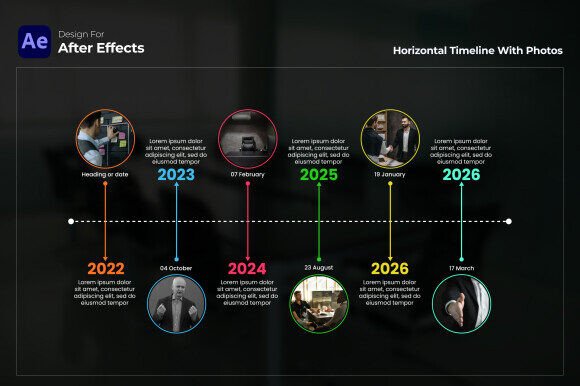
If your project requires a horizontal timeline, or if you need to work in software other than After Effects, this template may not be the best fit. But for vertical timelines with photo integration, it covers a wide range of use cases. Consider your audience, the story you want to tell, and the visual style that will resonate. If a clean, photo-rich vertical sequence aligns with your vision, then this template is worth exploring.
Making the most of the template
Once you decide to use the Vertical Timeline with Photos AE, a few practical steps can help you get the best results. Start by gathering your photos and text. Choose images that are clear and relevant to each milestone. Write short descriptions that add context without overwhelming the visual. Adjust the template’s colors and fonts to match your brand or project tone. Preview the animation to ensure the timing feels natural. Because the template is fully customizable, you can iterate until the timeline tells your story exactly as you want.
The commercial value of this template lies in the time it saves. Instead of building a timeline from scratch, you invest a small amount of time learning the template and then focus on content and customization. For creators who produce timelines regularly, that efficiency adds up. For one-time projects, it can mean the difference between a rushed result and a polished one.
Ultimately, a timeline is more than a list of events. It is a narrative device that helps people see the arc of a story. The Vertical Timeline with Photos AE gives you a flexible, professional container for that story. Whether you are a marketer mapping a campaign, a teacher sequencing a lesson, or a freelancer building a portfolio, the template helps you present your milestones in a way that is both clear and visually compelling.